

Ray Train: TorchTrainer over a dataset
A TorchTrainer runs a training loop on one CPU worker and reads its shard of a Ray Dataset.
When to use it. Moving a PyTorch loop to Ray Train: the same code later scales to many workers and GPUs by changing ScalingConfig.
The picture below is the graph drawn in Eugo’s visual Ray builder, and the cell under Generated code is the Ray code the builder produced from it. The code is plain Ray: it runs without the builder.
Back to the gallery · Tested with Ray 2.55.1
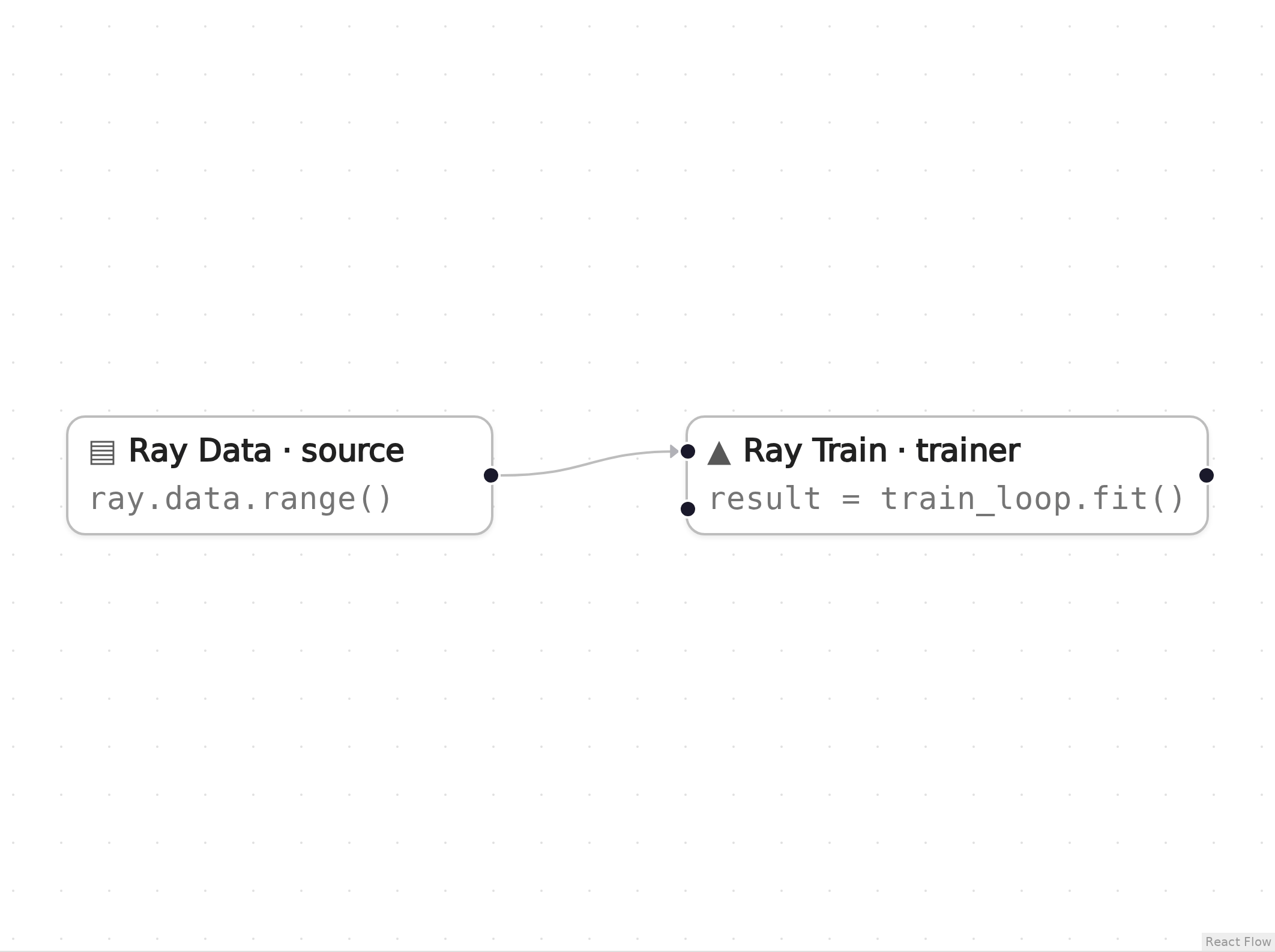
The graph in Eugo’s visual Ray builder.
Start a local Ray instance. The options keep the notebook quiet: no dashboard, and worker logs stay out of the notebook. Ray is capped at four CPUs so the example behaves the same on any machine. The generated code below only calls ray.init() when Ray is not running yet, so it reuses this instance.
import rayray.init(include_dashboard=False, log_to_driver=False, logging_level="ERROR", num_cpus=4)RayContext(dashboard_url='', python_version='3.12.3', ray_version='2.55.1', ray_commit='237c2455ebb1ea15a32dd9e1fdeb2d617badc37f')User functions
Section titled “User functions”The nodes in the graph call these ordinary Python functions and classes. In the builder you write them in a normal notebook cell, and the generated code refers to them by name.
import osimport tempfile
import rayimport ray.train.torchimport torch

def train_loop():    # Runs on every training worker. Fits y = 2x on the dataset's id column.    shard = ray.train.get_dataset_shard("train")    model = ray.train.torch.prepare_model(torch.nn.Linear(1, 1))    optimizer = torch.optim.SGD(model.parameters(), lr=0.01)    for _ in range(20):        for batch in shard.iter_torch_batches(batch_size=4, dtypes=torch.float32):            x = batch["id"].unsqueeze(1)            loss = torch.nn.functional.mse_loss(model(x), 2 * x)            optimizer.zero_grad()            loss.backward()            optimizer.step()    # Report the final loss together with a checkpoint, so the Result carries both.    with tempfile.TemporaryDirectory() as tmp:        torch.save(model.state_dict(), os.path.join(tmp, "model.pt"))        ray.train.report({"loss": loss.item()}, checkpoint=ray.train.Checkpoint.from_directory(tmp))
Generated code
Section titled “Generated code”This is the cell the visual builder generated from the graph above.
# Generated with Eugo's visual Ray builder
import rayfrom ray.train import ScalingConfigfrom ray.train.torch import TorchTrainer
if not ray.is_initialized():    ray.init()
ds = ray.data.range(8)
_trainer_n2 = TorchTrainer(train_loop, scaling_config=ScalingConfig(num_workers=1, use_gpu=False), datasets={"train": ds})result = _trainer_n2.fit()
Check the result
Section titled “Check the result”The cell below checks that the generated code did what the graph describes.
import os
assert result.error is None, result.errorassert result.checkpoint is not Noneassert result.metrics["loss"] < 1.0, result.metricsprint("final loss:", round(result.metrics["loss"], 4))print("checkpoint saved:", os.path.basename(result.checkpoint.path))final loss: 0.0075checkpoint saved: checkpoint_2026-11-07_20-30-28.904598How the graph maps to the code
Section titled “How the graph maps to the code”Each step names a node in the picture, the lines of the generated cell it produced, and what those lines do. The node id (for example n1) is also the suffix of the variable that holds the node’s result.
Setup (lines 1, 3–5 and 7–8)
# Generated with Eugo's visual Ray builder...import rayfrom ray.train import ScalingConfigfrom ray.train.torch import TorchTrainer...if not ray.is_initialized(): ray.init()The first line marks the cell as generated. The builder then adds an import for every Ray API the graph uses and a guarded ray.init(), so re-running the cell reuses the running cluster.
Source (node n1, line 10)
ds = ray.data.range(8)An eight-row dataset; the trainer gives each worker its shard as “train”.
Trainer (node n2, lines 12–13)
_trainer_n2 = TorchTrainer(train_loop, scaling_config=ScalingConfig(num_workers=1, use_gpu=False), datasets={"train": ds})result = _trainer_n2.fit()TorchTrainer(train_loop, scaling_config=ScalingConfig(num_workers=1, use_gpu=False), datasets={“train”: ds}) launches the worker group; fit() blocks and returns a Result.
Clean up
Section titled “Clean up”Shut down Ray, so the next notebook starts fresh.
ray.shutdown() ganymede is made by Eugo